
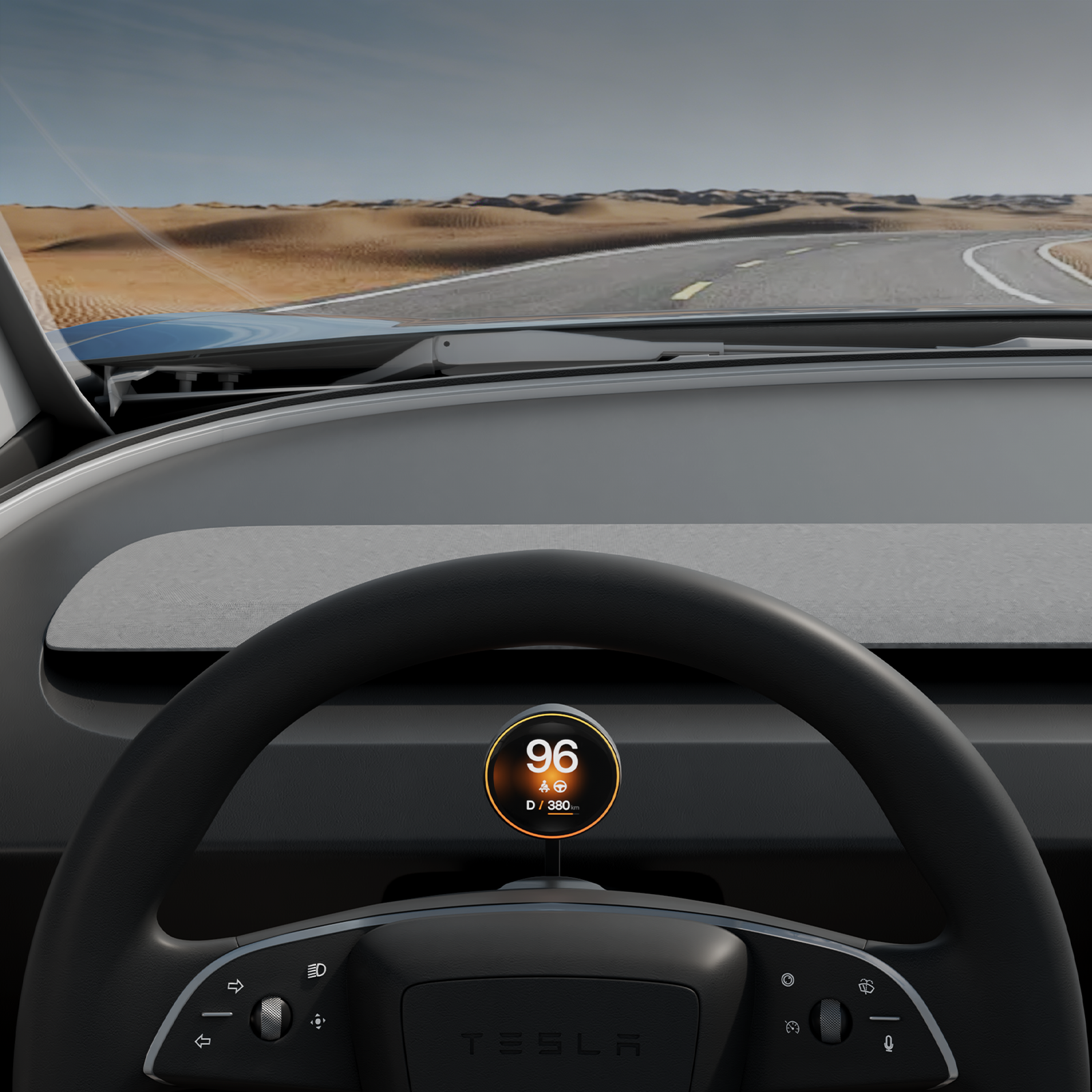
You are cruising at 70 mph in a new Model Y Juniper when you want one simple number: your current speed. The road is ahead of you, but the answer is still on the center display—down and to the right. The glance takes only a moment, yet it is a moment when your eyes are not where you want them.
Some owners adapt quickly to Tesla's center-screen layout. Others never stop wishing that speed, gear, battery, turn-signal status, and blind-spot information were directly in front of the steering wheel. The right upgrade should solve that problem without turning the clean Juniper cabin into a dashboard full of screens and exposed cables.
 This "HUD" Is Actually a Compact Instrument Cluster
Tesla owners often search for a "HUD display," but the Veekys unit is not a windshield-projection HUD. It is a compact 1.75-inch OLED instrument cluster mounted behind the steering wheel, where the driver can see essential vehicle information without adding a large tablet-style display.
That distinction matters. A traditional projection HUD can be affected by reflections and windshield conditions. A large aftermarket screen may add CarPlay, navigation, video, and other features, but it also changes the visual balance of the cockpit. The Veekys approach is more focused: restore the essential driver display while preserving Tesla's minimalist interior.
The Main Benefit: Essential Data in the Driver's Natural View
Once installed, the display automatically starts with the vehicle and presents the information drivers check most often: speed, PRND gear position, battery percentage, remaining range, turn-signal status, blind-spot monitoring, and speed-limit alerts.
The product specification lists a response time of 15 milliseconds or less. In practical terms, the goal is not to impress the driver with a technical number; it is to keep the small display feeling connected to the vehicle rather than like a delayed second screen.
This is also why the display does not try to become another infotainment system. It keeps the job narrow: show the driving information that belongs in front of the driver.
 Will Installation Affect Wiring, Factory Functions, or Warranty?
This is the question most likely to stop a new Model Y owner from buying an electronic accessory—and it should be answered early.
The installation does not require cutting factory wires, drilling the dashboard, modifying vehicle software, or replacing original interior parts. The instrument cluster is removable, and the system is designed not to interfere with factory functions. Installing this non-invasive accessory does not void the Tesla vehicle warranty.
The clean result does not mean the system has no components. The OBD module provides power to the system, an A-pillar transmitter sends vehicle data wirelessly to the display, and the related modules use hidden plug-in connections. After installation, the cabin has no exposed wiring.
This is a more accurate promise than simply saying "no wiring." The real advantage is hidden, reversible integration: no wire cutting, no drilling, no trim replacement, and no cable clutter in the finished cockpit.
Why OLED Fits a Minimalist Tesla Interior Better Than a Basic LCD
A driver display is always visible, even when the cabin is dark. That makes the panel technology part of the interior design—not just a specification.
The Veekys display uses a 466 × 466 OLED panel rated at 700 cd/m² brightness, a 100,000:1 contrast ratio, and 130% NTSC color gamut. OLED pixels can switch off for true black areas, so the dark background blends more naturally into the black housing and dashboard than a basic LCD that continues to glow gray at night.
During daylight, brightness and contrast support readability. At night, the dark areas remain dark instead of creating a bright gray rectangle behind the steering wheel. The result is closer to a factory-style driver display than an add-on tablet.
 App Control and OTA Support Without Confusing the Connection
The vehicle data link and the Veekys App connection serve different purposes. Vehicle information is transmitted to the instrument cluster through the system's dedicated modules. Bluetooth is used for the App connection, allowing the owner to adjust themes and settings and receive supported OTA firmware or compatibility updates.
That separation should be clear because "Bluetooth display" can sound as if speed and gear data depend on a phone connection. They do not. The display starts and works with the vehicle; the App is the control and update layer.
Owners can also switch visual themes and personalize supported interface elements. Customization is useful, but it remains secondary to the main job: delivering clear driving information in the correct location.
Center Screen, Large CarPlay Display, or Compact OLED Cluster?
| Feature | Center Screen Only | Large LCD/QLED CarPlay Display | Veekys Compact OLED Cluster |
|---|---|---|---|
| Driver-information location | Center display, down and right | Directly ahead, but with a larger screen | Directly ahead in a compact 1.75-inch display |
| Primary purpose | Vehicle controls and infotainment | Vehicle data plus CarPlay, media and apps | Essential vehicle data only |
| Display approach | Factory center touchscreen | Usually LCD or QLED, larger format | OLED with true-black background |
| Cabin impact | Original minimalist layout | Adds a prominent secondary screen | Designed for a low-profile OEM-style fit |
| Installation concern | None | Varies by product; may require routing and trim work | Plug-in hidden modules; no wire cutting, drilling or exposed wiring |
| Updates and settings | Tesla software | Depends on supplier | Veekys App settings and supported OTA updates |
A 30-Minute Upgrade That Does Not Try to Redesign the Car
The installation is designed for owner completion in about 30 minutes, depending on the vehicle and the installer's experience. The kit includes the components and tools needed for the plug-in installation, and the display mounts on the steering-column cover without replacing it.
That last point is important for owners who care about fit and finish. Replacing an original trim part can introduce a different texture, color, or fit. Keeping the original structure helps the final result look integrated—and makes removal straightforward.
Who Is This Upgrade For?
The Veekys OLED instrument cluster is most useful for a Model Y Juniper owner who wants driver information directly ahead but does not want a large entertainment screen or a visually busy cockpit.
It is a strong fit when you care about:
- seeing speed, gear, battery, range, turn-signal and blind-spot information without looking toward the center screen;
- maintaining the Juniper cabin's black, minimal visual language;
- avoiding wire cutting, drilling, software modification and exposed cables;
- using a compact OLED rather than a bulky LCD or full CarPlay display;
- keeping long-term settings and compatibility support through the Veekys App and OTA updates.
For a broader new-owner upgrade plan, see The First 5 Things You Should Do to Your 2025 Model Y Juniper (The OEM+ Guide).
Frequently Asked Questions
Is this a true windshield HUD?
No. It is a compact OLED instrument cluster / driver display installed behind the steering wheel. "Tesla HUD display" is a common search term, but the product does not project an image onto the windshield.
Does installation require wire cutting or drilling?
No. The system uses plug-in hidden modules and does not require wire cutting, drilling, vehicle-software modification, or replacement of original interior parts.
Does the instrument cluster affect the Tesla warranty?
Installing this non-invasive accessory does not void the Tesla vehicle warranty. It does not modify factory wiring, software, or original vehicle functions.
What information can it display?
The supported information includes speed, PRND gear position, battery percentage, remaining range, turn-signal status, blind-spot monitoring, and speed-limit alerts.
How long does installation take?
The current product information states about 30 minutes, depending on the vehicle and the installer's experience.
Is it compatible with every Model Y?
This article and product link focus on the 2025+ Model Y Juniper version. Model 3 Highland and LHD/RHD versions use specific configurations, so confirm the vehicle, model year, and steering position before ordering.
Put the Essential Information Back in Front of You
Tesla's center-screen design is part of what makes the Model Y Juniper feel different. The Veekys instrument cluster does not try to undo that design. It fills one specific gap: essential driving information is easier to check when it is directly ahead.
The compact OLED panel, hidden plug-in architecture, no-exposed-wiring finish, App settings, and OTA support are designed to complete the cockpit without making it feel modified.



Share:
The First 5 Things You Should Do to Your 2025 Model Y Juniper (The OEM+ Guide)